AI-NATIVE SERIES · AGENT ENGINEERING
Desktop App Control: Four Doors, and the App Picks Which One Your Agent Gets
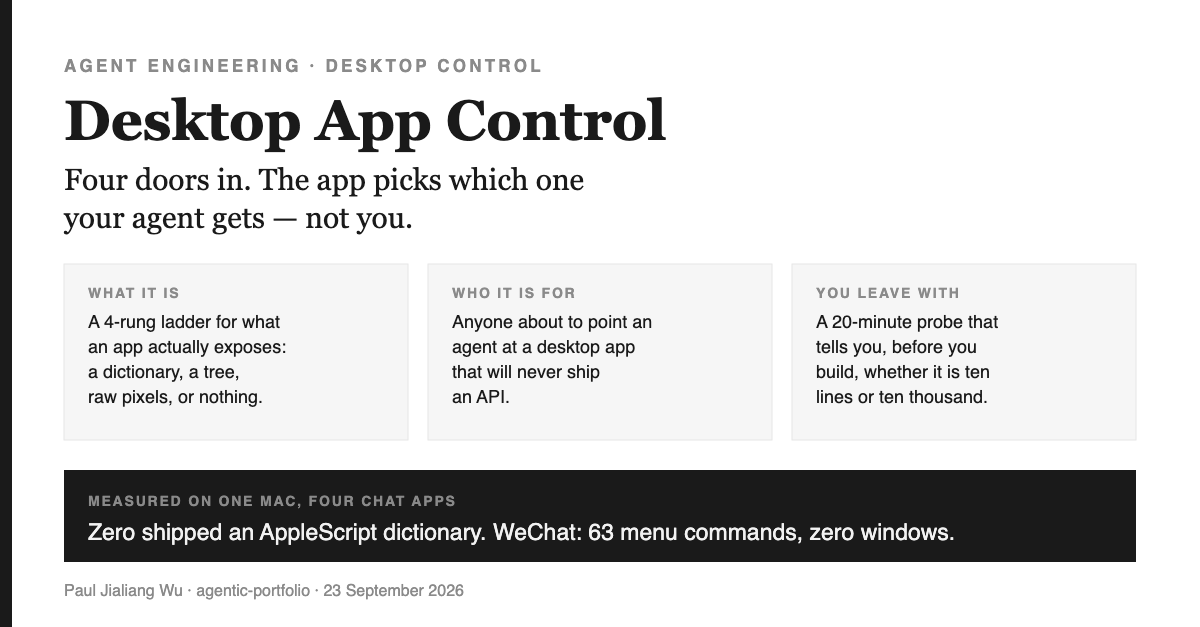
What this is. A way to answer one question before you write any desktop automation: which door into this app is actually open? Four doors exist, the app picks which one you get, and the choice decides whether your automation survives the next update.
Why it matters. Teams build agents against the door they assumed, discover the real one months later, and rewrite. The measurement takes seconds and the four apps most people assume are scriptable are, measurably, not.
What you can do after. Probe any app on your Mac, read its rung, and know before you start whether you are writing ten lines or ten thousand — and whether the thing you build can ever run while you are using the machine.
What desktop app control covers here, and who it's for
This is for anyone about to point an agent at a desktop application — a chat client, a design tool, an internal app that will never have an API. It covers how to measure what an app exposes, what each surface costs, and the two findings that cost me a probe run to learn. It does not cover cloud APIs: if the app you want has a real API, use it and stop reading, because everything below is about the case where it doesn't.
One picture will carry the whole piece, so let me introduce it as a tool rather than a flourish.
One picture: the restaurant and its suppliers
A restaurant kitchen deals with suppliers, and not all of them are the same kind of easy.
The best supplier delivers to your loading dock with a printed manifest. You never leave the kitchen. You order by name — "forty kilos of the Tuesday flour" — and the name still means the same thing next year.
The second-best takes a phone order. You describe what you want by name and position: the thing on the third shelf, the one labelled arborio. Slower, and the shelves get rearranged sometimes, but you are still using words, not coordinates.
The third has no phone at all. You drive to the market, find the stall by eye, and point. It works. It also means you personally have to be standing there, in daylight, and if they move the stall you are looking for a new landmark.
And the fourth supplier simply isn't open.
Every one of those maps to something a macOS app either exposes or refuses, and the mapping is exact:
| Supplier | What the app exposes | How you address a thing | Survives an update? |
|---|---|---|---|
| Loading dock + manifest | R3 AppleScript dictionary (sdef) | By name, in the app's own vocabulary | Usually — it's a published contract |
| Phone order | R2 Accessibility tree (AX) | By role and title | Often — until the UI is restructured |
| Drive to the market | R1 Pixels + synthetic clicks | By coordinate and appearance | Rarely — a redesign is a rewrite |
| Not open | R0 No window surface | — | — |
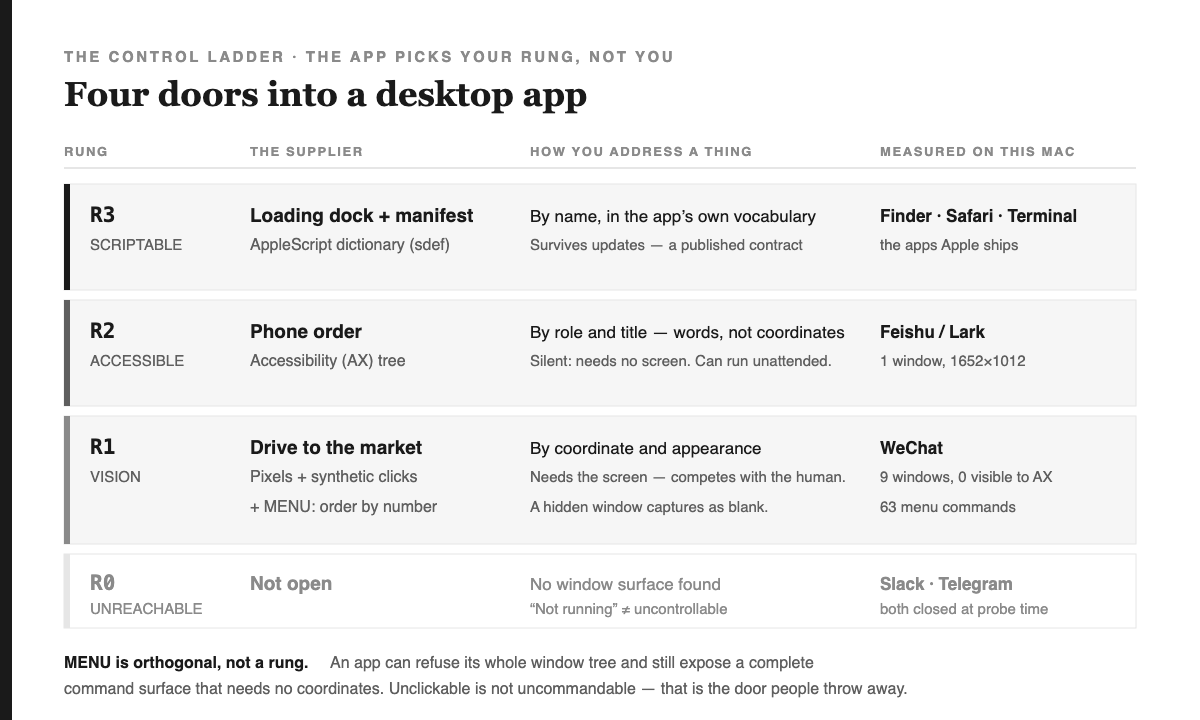
The ladder is the useful part, because the rungs are not interchangeable and you do not get to choose. The app chose, when it was built, years before you showed up. Your only real decision is whether to find out now or after you have written the automation.
So I measured, instead of assuming
I wrote a small probe — four independent checks per app — and pointed it at my own machine. The checks are deliberately separate, because an app can answer one and refuse another, and the combination is the whole story.
$ appctl survey WeChat Feishu Slack Telegram Finder Safari Terminal

  ⬜ Slack       R0_UNREACHABLE
  ⬜ Telegram    R0_UNREACHABLE
  🟨 WeChat      R1_VISION          +MENU(63)
  🟦 Feishu      R2_ACCESSIBILITY   +MENU(61)
  🟩 Finder      R3_SCRIPTABLE      +MENU(152)
  🟩 Safari      R3_SCRIPTABLE
  🟩 Terminal    R3_SCRIPTABLE      +MENU(132)
The first result is the one worth sitting with.
Not one of the four chat apps ships an AppleScript dictionary. WeChat, Lark/Feishu,
Slack, Telegram — sdef fails on all four. Finder, Safari and Terminal all pass. The
apps where your work actually happens are on the lower rungs; the apps Apple ships are on the top
one.
That single fact invalidates the most common plan. The reference implementations people copy — including the Safari harness in CLI-Anything, which is excellent — lead with AppleScript, because Safari has a dictionary. Copy that pattern toward a chat app and it does not transfer. Not "works less well". Does not transfer.
The finding I did not expect: 63 commands and zero windows
WeChat is the interesting case, and it is interesting because it answers two questions contradictorily.
Ask the accessibility API how many windows WeChat has, and it says zero. Ask the window server — the layer underneath, the one that actually composites pixels — and it reports nine, the largest at 1418×879. The windows exist. WeChat simply does not show them to the accessibility API.
If you stop there, you write WeChat off. I nearly did. But the menu bar is a separate surface,
and WeChat's is fully exposed: 63 commands across seven menus, including
Show Next Unread Chat, Chats, Contacts and
Favorites.
Unclickable is not uncommandable. An app can refuse its entire window tree and still hand you a complete command surface that needs no coordinates at all. Treating "empty AX tree" as "uncontrollable" throws away the one door that was open.
In the restaurant: the stall has no phone and won't let you browse the warehouse — but there is a printed menu nailed to the front, and you can order by number. That is a worse interface than the loading dock. It is enormously better than nothing, and it is stable, because menu commands are named, not positioned.
The second finding: a hidden window photographs as nothing
WeChat sits at R1, so reading it means capturing pixels. Its main window is enumerable at 1418×879 while the app sits closed in the tray, which made me optimistic: capture the window by id, read it, never disturb the user.
The capture succeeded. It produced 94 KB of pure white.
An offscreen window can be listed but not photographed; there are no rendered pixels to hand over. This is not a bug to route around. It is a constraint with a consequence that reaches all the way up into scheduling:
Vision-rung control cannot run behind your back. The app has to be on screen, which means the agent competes with you for the display. An automation that quietly reads WeChat at 3pm while you work is not a thing that can be built this way.
So the probe does not merely report the rung. It reports that R1 is never unattended, and it says why. Which brings me to the part I would argue is the actual contribution.
A rung is capped, not claimed
The temptation with a classifier like this is to output a capability: "WeChat: controllable." That sentence is worth exactly as much as the weakest thing holding it up. I have written before about capping a guarantee at its weakest assumption, and the failure that discipline catches is this one: a guarantee gets asserted at the level someone hoped for rather than the level the evidence earns.
So the probe borrows that discipline. It never asserts a rung — it derives one from four measurements, then applies every cap the measurements force:
🟨 WeChat  R1_VISION
   +MENU — 63 commands, no coordinates needed
   unattended: NO — needs the screen
   ⚠ capped: every window is offscreen: capture returns a blank image, so the
     app must be brought on screen before it can be read
   ⚠ capped: vision control competes with the human for the display — it cannot
     run unattended while the machine is in use
An app that is merely closed reports R0 with a cap saying the probe is inconclusive — because "not running" and "uncontrollable" are different facts, and collapsing them would have written off Slack and Telegram on the evidence above. The caps are enforced by tests, not by prose in a README, which is the only version of a rule that survives contact with a deadline.
What broke when I ran it — including on the easiest app on the Mac
I recorded fixtures by hand from my first exploratory probes, wrote the classifier against them, got nineteen green tests, and felt good. Then I pointed the live backend at the same apps.
Two things were wrong, and one was embarrassing.
Finder came back R1_VISION. Finder — the most
scriptable application on the machine, the canonical AppleScript target since 1993. My bundle
lookup scanned /Applications, and Finder lives in
/System/Library/CoreServices. Not found, so no dictionary read, so the top rung
collapsed to the bottom one. A classifier that misclassifies the easy case is worse than no
classifier, because you trust it.
Feishu resolved to no bundle at all. Its process is named Feishu;
its application bundle is Lark.app. Any name-to-path guess finds nothing.
Both have the same root cause and the same fix: ask the running process where it lives, instead of guessing from its name. The process knows. I was inferring something the system would simply have told me.
And both were only findable because the fixtures were recorded rather than invented — a
fake I made up would have agreed with my wrong assumption forever. My hand-recorded numbers were
also just wrong in detail: I had written 19 menu commands for WeChat where the real count is 63,
and 23 windows where the filtered count is 9. The fixtures now carry the real output, pasted from
--json.
Build it yourself in about twenty minutes
The whole thing is four probes and a pure function. No dependencies beyond the standard library and whatever your OS already ships.
- Scripting. Run
sdef /Applications/Foo.app. A dictionary means rung 3. Ignore theNSAppleScriptEnabledflag in Info.plist — apps set it inconsistently, so record it and don't decide on it. - Accessibility. Ask System Events for
count of windows. Needs Accessibility permission; without it you get an error, and the error must be reported verbatim rather than translated into "zero windows" — those mean opposite things. - Menu bar. Enumerate its items and count their children in one round trip. One call per menu cost about three seconds each against an Electron app and made the whole probe take twenty-one seconds.
- Window server. The only way to see windows the AX API refuses. On macOS 15+
this needs a small Swift helper, because
CGWindowListCreateImagewas obsoleted and there is no route to the window list from the standard library.
Then classify: highest surface that answered wins, menu is recorded orthogonally, and every unmet precondition becomes a cap rather than a footnote. Keep the classifier pure — no I/O — and the interesting logic becomes testable without a Mac in the loop.
What this does not tell you
A gate that overclaims invites gaming, so here is what the rung genuinely cannot see.
It measures reachability, not usability. Feishu sits at R2
with a live tree, and its top level is one AXGroup and three buttons — Electron apps
withhold their real tree until an assistive client asks for it. Reachable is the beginning of the
work, not the end.
It says nothing about whether you are allowed. An app's terms of service, your employer's policy, and the other people in the conversation all have standing that a probe cannot measure. Driving your own client on your own machine is ordinary accessibility usage — it is what every screen reader does. Automating an account at scale is a different question with a different answer, and the probe will happily tell you a door is open when you should not walk through it.
It is a snapshot. Rungs move. An app can ship accessibility support in a point release, or withdraw it. The measurement is cheap precisely so you can re-run it rather than cite it.
And the honest ceiling: the rung tells you the cost, not the value. Knowing WeChat is vision-only with a 63-command menu does not tell you whether automating it is worth doing. It tells you what it will cost if you decide to, which is the number people usually discover last.
The part that generalises
The specific finding is about chat apps on macOS and will age. The shape underneath it won't.
Any time you are about to automate something you do not control, there is a ladder of interfaces it might expose, you do not get to pick your rung, and the cheapest possible move is to measure which one you're on before you build. The failure mode is universal and it is always the same: someone assumes the loading dock, writes months of code against it, and finds out at integration time that the supplier has no phone.
Twenty minutes of probing, run first, would have said so.
Related
appctl on one Mac running macOS 26 and is reproducible offline against the recorded
fixtures with appctl --fake probe <app>. The apps are mine; the doors are
everybody's.